
Playground
Try any catalog model in the browser.
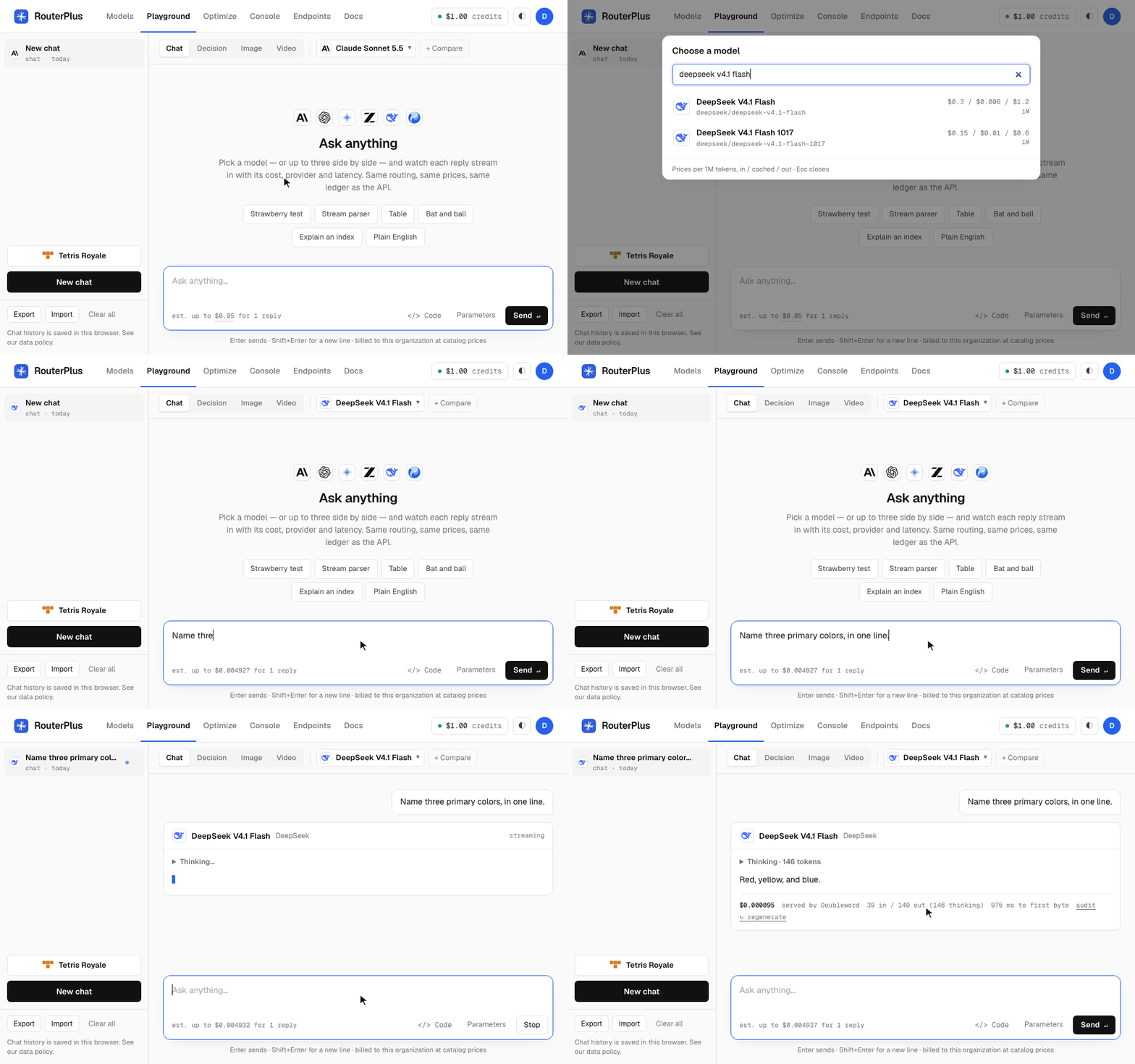
The Playground at https://demo.routerplus.com/playground runs chat, typed decisions and images on the same catalog, routing, prices and ledger as the API. Each answer shows the provider that served it, the token counts and the cost. You can look around without an account. To send, you need one (see Without an account).
What it does
- Any catalog model.
⌘K/Ctrl+Kopens the model picker.- Models of your current mode come first (chat models in Chat, decision models in Decision).
- Chat starts with Claude Opus 5.5, then Claude Sonnet 5.5, then the rest, newest first.
- Search matches a model's name, id, lab, providers and kind: type
decisionfor every decision model,imagefor the image models,freefor the free ones. - Each row shows the lab's mark and the price per million tokens, in / cached / out (a dash where there is no cached price). An image model shows the most one image can cost. A chat model shows its context length.
- To pin a dated snapshot of a catalog model, type its id. An id that is not listed is used as typed.
- Decision order. Decision mode lists Jev 1.13, GPT-6 Luna Decisions, Bespoke Nimble v4 Max, ScaleDown Classify-1, Bespoke Nimble v4, Clef, Clef-flash, Kev 4B, GLiNER-2.5-Decide, Decider 2B and Sage 1.2, in that order.
- Compare up to three chat models side by side (Decision mode compares up to four). Compare adds a column. One prompt goes to every column. Each column streams into its own card with its own provider, tokens, latency and cost. Each column keeps its own thread: a follow-up sees that model's replies only. Removing a column leaves the rest unchanged.
- Sample prompts under the composer send a real prompt in one click, until the conversation starts.
- The first is always the strawberry test (how many times "r" appears in "strawberry"). Each reply says passed, failed with the count the model gave, or that it gave no clear count.
- The others are random: a reasoning trap, a code task, structured JSON, a table, a six-word story and more.
- Streaming replies with stop, regenerate, a collapsible "thinking" section for reasoning models, and safe rendering of code, lists, links and tables. A table is drawn only for a real markdown table: a header row, then a divider row such as
|---|---|with the same number of cells. Other text with a pipe shows as written. A wide table scrolls sideways. - Code and Parameters sit to the left of Send.
- Code shows the next request as curl, Python or Node.
- Parameters holds a system prompt, temperature, top_p and max output tokens, per conversation.
- Cost on every reply: the same
usage.costthe API returns, the time to first byte, and anauditlink to the request's ledger rows. - Organizations: if you belong to several, the sidebar selector sets which one the playground bills.
Tetris Royale
Tetris Royale compares nine System One decision models on the same block sequence. GPT-6 Luna Decisions plays next to Jev, Bespoke Nimble v4 Max is Bespoke's player, and ScaleDown Classify-1 plays last. Open it from the Playground mode bar. The arrow button at the top left goes back.
- It bills the selected organization through its own managed key, Tetris Royale, held on the server. Ordinary Playground keys keep their own limit. No API key reaches the browser.
- The server validates the board and match counters, then builds the decision prompt and the legal choices. The game relay accepts no custom prompts or questions.
- Every request follows the organization's normal credits, limits, billing and routing.
Match rules:
- A match is 200 pieces by default. Settings offers 20 up to a thousand.
- Each model plays on its own, so a slow or rate-limited model does not hold up the others.
- A transient 429 cools down only that model. It retries up to three times and respects Retry-After. Other errors offer a retry button.
- Matches in one organization share per-model pacing on the server. A busy queue for one model does not pause the others. Gateway quotas still apply.
- Pause finishes current moves and stops new calls. Switching tabs pauses the match. Reset starts over. Match state lives only in the open page.
Settings offers five Block sequences, each a repeatable order of pieces that all models share. The boards keep a fixed order: Jev, GPT-6 Luna Decisions, Perplexity, Bespoke, Clef, Clef-flash, Kev, Decider.
Standings rank the models by score at each model's current progress. A row moves when its model passes another. Equal scores share a place. A line clear or a change of place shows for a moment. Final standings appear when every board finishes or tops out.
Both move modes use a 10 × 20 board, seven-bag pieces, line-clear and level points, hard-drop points, combos, back-to-back clears and all-clear bonuses. Settings → Moves picks how a piece reaches its place:
- Drop and slide (the default): the piece turns at the top, then falls. While it falls it can move left or right, so it can tuck into a gap under an overhang. It never turns while it falls. The model picks any position the piece can reach this way. Each choice says whether it is a straight drop or a tuck, and the points it scores now. The board shows the piece turn, drift toward its column and tuck.
- Drop only: the model picks a rotation and a column, and the piece drops straight down.
Neither mode has hold, wall kicks, T-spins or a gravity deadline. Rules & scoring gives the exact rules.
Decision
A decision model returns typed answers in place of text. You give it a state (a message, a ticket, a list of items) and typed questions. It returns a typed answer for each question, with the probability or confidence behind it. Use it for routing, classification and other decision points in an application. The catalog has twelve:
| Jev 1.13 | Bespoke Nimble v4 and v4 Max | Clef and Clef-flash | Decider 2B and Kev 4B | Perplexity Decider v1 27B | GPT-6 Luna Decisions | Sage 1.2 | ScaleDown Classify-1 | GLiNER-2.5-Decide | |
|---|---|---|---|---|---|---|---|---|---|
| Catalog id | typesafe/jev-1.13 | bespokelabs/nimble-v4, bespokelabs/nimble-v4-max | cloudflare/clef, cloudflare/clef-flash | routerplus/decider-2b, routerplus/kev-4b | perplexity/pplx-decider-v1-27b | openai/gpt-6-luna-decisions | levanto/sage-1.2 | scaledown/classify-1 | fastino/gliner-2.5-decide |
| Made by | TypeSafe | Bespoke Labs | Cloudflare | RouterPlus, our own models | Perplexity | OpenAI | Levanto | ScaleDown | Fastino |
| Numbers it returns | probabilities | probabilities, at full precision | probabilities, to 4 decimals | probabilities | probabilities, at full precision | probabilities, to 2 decimals | probabilities | probabilities, at full precision | confidences, not calibrated probabilities |
| Price | $0.042 per million input tokens | $0.04 (v4) or $0.09 (v4 Max) per million input tokens | $0.24 (Clef) or $0.09 (Clef-flash) per million input tokens | free: our own models, at $0 | $0.04 per million input tokens, the state billed once per question | $0.10 per million input tokens, about 150 tokens for each question | $0.05 per million input tokens, the state billed once per question | $0.05 per million input tokens, each question its own call | $0.03 per million input tokens |
Jev, the two Nimble models, Clef, Clef-flash, Decider 2B, Kev 4B, Perplexity Decider, GPT-6 Luna Decisions, Sage and ScaleDown Classify-1 are the eleven System One models. On this page, "System One" means all eleven.
- System One models use Jev's question format (System One). They take choice, rating (2 to 10 levels) and yes/no questions, and tags as one yes/no per tag. When unsure, they give their best answer, with probabilities. GPT-6 Luna Decisions can also decline a question (Refused).
- GLiNER-2.5-Decide uses GLiNER's schema. It takes yes/no, choice, rating (exactly 5 levels) and tags, all as labels. When unsure, it gives its best label, with a confidence.
Per-model limits
Decision mode checks these limits before a run. It counts the questions in order, and only the ones the column will send. On Nimble, Clef and Clef-flash, a question that would cross 64 shows Not askable on Bespoke Nimble v4 (or on the other Nimble models, or on Clef, or on Clef-flash) and stays out of that column's request. It takes none of the 64, and a later question that still fits is sent. So the provider never refuses the whole column. Perplexity Decider and GPT-6 Luna Decisions are counted the same way, against their own limits.
| Model | Own limits |
|---|---|
| Nimble, Clef and Clef-flash | A choice needs at least 2 options. One request holds at most 64 questions, each tag counted as one. |
| Clef and Clef-flash | Also: every answer key is 1 to 100 letters, digits, _, . or -. A question id in Decision mode always fits. A tag can break the rule: Decision mode asks each tag under the key <question id>__<tag id>, and a long question id with a long tag id can pass 100 characters. |
| Perplexity Decider v1 27B | One request holds at most 128 questions, each tag counted as one. It takes a one-option choice, as Jev does. A question that would cross 128 shows Not askable on Perplexity Decider v1 27B. Perplexity bills the state once for each question and each tag. |
| GPT-6 Luna Decisions | A choice needs at least 2 options. One request holds at most 200 questions, each tag counted as one. A question that would cross 200 shows Not askable on GPT-6 Luna Decisions. Each question and each tag adds about 150 input tokens. OpenAI can decline one question and answer the rest. The column shows that answer as Refused, and the call is still billed. |
| Decider 2B and Kev 4B | None. For Decider 2B and Kev 4B, Decision mode checks no limit of their own: probed on 2026-10-02, each answers a one-option choice and a request of 200 questions. Their columns follow the family's rules, as a Jev column does. |
| ScaleDown Classify-1 | None in Decision mode. Probed on 2026-10-12, it answers a one-option choice and a request of 65 questions. It reads System One as text, so the gateway sends an option without a description as "" and a JSON state as its JSON text. The answers mean the same. |
The decision console
In Decision mode, the composer becomes a decision console: a box for what the models judge, and up to 20 questions for every column.
- Each question is a line of text and an answer type: Yes / no, Pick one (one of your options), Rating (a scale, lowest level first; a new rating starts with five levels) or Tags (which of your tags apply).
- Options, tags and levels are rows: a short name, which the model answers with, and what it means.
- You never write an answer key: Decision mode names each question from its words, and Code shows the names it sends.
- A yes / no saved by the earlier editor with descriptions of yes and no keeps them, under the question. Only the System One models take them. Remove descriptions makes the question plain.
An example loads by itself. The Example menu picks another, or Start blank. The examples cover checking an answer against its sources, reviewing an agent's run, catching a prompt injection, triage, bug severity, lead qualification, code review, moderation, feedback tags and a JSON state. Run runs it once. Run 10 times runs every column ten times (see Run 10 times).
One form for every model
You write each question once. Each decision model has its own question format, so Decision mode translates the form for each column:
| Question | System One (Jev, Nimble, Clef, Clef-flash, Decider 2B, Kev 4B, Perplexity Decider, GPT-6 Luna Decisions, Sage, ScaleDown Classify-1) | GLiNER-2.5-Decide |
|---|---|---|
| Yes / no | a noul question | a classification: the question text is the task, the labels are yes and no |
| Choice, 2 to 20 options, descriptions optional | a choice question: each option, with its description or none | a classification: one label per option, "name: description" (or "name"), read back as the option's name |
| Rating, exactly 5 levels, low to high | a score question with 5 levels | a classification: the labels "0: <level 0>" to "4: <level 4>", read back as the level |
| Tags, 1 to 20, descriptions optional | one noul question per tag, asked as <question> Does this apply: <tag>? (with the tag's description after the tag, when it has one) | a multi-label classification that returns every tag with its confidence; a tag applies at 0.5 or more |
- GLiNER reads each label as text, so Decision mode puts an option's or level's description into its label. The description changes GLiNER's answer.
- Decision mode asks GLiNER at threshold 0 (
cls_threshold: 0), so GLiNER always names its top label. At GLiNER's default of 0.5, a task answersnullwhen no label reaches it. Decision mode shows anullas Not sure. - Each tag is one question in a System One column's request. The column shows the tags together.
- Decision mode builds a System One body from the catalog's record of the model's format, never from its name.
Compare
Put up to four models side by side with Compare: up to four of the twelve decision models, or three decision models and a chat model. A chat or image conversation stops at three. One turn cannot hold all twelve decision models. A column's chip swaps one model for another.
With two or more decision models, the question builder follows the tables above:
- Before the run, it marks a question that one of the chosen models cannot take, and names the models that can. Examples: a rating that does not have 5 levels (System One models only), a choice with one option (Jev, Decider 2B, Kev 4B and Perplexity Decider only: Nimble, Clef, Clef-flash and GPT-6 Luna Decisions refuse a one-option choice), more than 20 options, a question past the 64 keys of one Nimble, Clef or Clef-flash request, the 128 keys of one Perplexity Decider request or the 200 keys of one GPT-6 Luna Decisions request, and a tag whose key is longer than Clef's 100 characters.
- Models refused for the same reason share one line. A Nimble, Clef, Decider 2B, Perplexity Decider or GPT-6 Luna Decisions column is named as itself, never Jev.
- Each column still gets the questions its model can take. A question it cannot take shows Not askable on that model and stays out of that column's request.
- GLiNER uses the question text as its task name, at most 256 characters. Two questions with the same text, or a question longer than 256 characters, are not askable on GLiNER.
Every example uses forms that every decision model takes, the tags example included.
Run 10 times
Run 10 times runs the whole comparison ten times with the same state and questions. It shows one ledger in place of a card per column. Each column sends up to two requests at a time, and the ledger fills in as runs come back. The ledger shows:
- For each model and question, the most common answer and in how many runs (10/10 when it never changed). A pick-one question lists every option the runs chose, with its count.
- The averages: the mean probability of yes, the mean confidence of a choice, the mean level of a rating (a marker on the track, with a faint dot for each run), and for tags how many runs each tag applied in. Bars and markers move as each run lands.
- At the head of each column, the mean time per run and the cost of all runs. Each run's time is a dot on a strip, and the mean is a line.
- For each row, whether the decision models agree on their most common answers (for a rating, mean levels within 0.5 of each other).
Each column is billed as one request per run: ten runs of four columns are 40 requests. A column that hits a rate limit stops and says so, and the other columns go on. Stop stops them all.
On Decider 2B and Kev 4B, the ten runs send the same request, so RouterPlus answers the repeats from its cache, which keeps an answer for 600 s. Those runs come back sooner than the first one, cost $0, and repeat the first run's answer exactly. On these models, the ten runs do not show how much the model's answer varies. The first request after a quiet period can take 15 to 20 s while RouterPlus starts the model.
Compare view
Below the columns, the compare view draws each question as one row, with one cell per column:
| Question | Each cell shows |
|---|---|
| Yes / no | The verdict (Yes, No or Not sure) and a bar from 0 to 1: the probability of yes for System One, the confidence in the chosen label for GLiNER (labelled confidence), the stated answer for a chat model. |
| Choice | The chosen option (or Not sure) and its probability or confidence. Per-option bars where the model returns them: a System One model's add up to 1, and GLiNER returns the chosen label only. |
| Rating | One 0 to 4 track, with one marker per model (a System One score or GLiNER's chosen level), and the confidence beside it. |
| Tags | A grid of tag by model: applies ✓, does not apply ✗ or not sure ?, with the score. |
- Each row says whether the decision models agree: the same verdict, the same option, a level within 0.5, or the same set of tags with every tag answered. A tag that one model is not sure about cannot be compared, and the row says so.
- The view shows only numbers a model returned, each labelled with what it means.
- GLiNER's numbers are confidences, not calibrated probabilities: a GLiNER 0.9 and a Jev 0.9 mean different things.
- A Clef confidence and a Jev confidence also mean different things, because Cloudflare computes Clef's in its own way. So compare their probabilities, not their confidences.
- GPT-6 Luna Decisions' confidence is OpenAI's own.
- A Decider 2B or Kev 4B column costs $0.00, with no list price or discount beside it: the model is free, so there is nothing to take off.
Answer cards
- A System One model's cards (Jev, Nimble, Clef, Clef-flash, Decider 2B, Kev 4B, Perplexity Decider, GPT-6 Luna Decisions and Sage) show bars: the chosen option, the probability of each alternative, and the model's confidence.
- A question that OpenAI declined on a GPT-6 Luna Decisions column shows Refused, with no bars.
- GLiNER's cards show the chosen label and its confidence, and for tags each tag's confidence.
A chat model in a column gets the same questions in words, tags included where the prompt can say them. When it answers in the JSON it was asked for, its answers render as the same cards and in the compare view.
Billing for decisions
A Decision run is a real API call to POST /v1/decisions under the playground key.
- It is billed to your organization at the model's price.
- It counts against the playground key's limits and the organization's.
- It appears in
GET /v1/generation. Each answer card has anauditlink to its ledger rows. - A discount can make a run free. The cost line shows what you paid and, with a discount, the list price and the percent off.
From your code, call POST /v1/decisions in the model's own question format. Only Decision mode translates the form. The API does not.
Images
Pick an image model and the composer describes an image. The picker marks image models image, with the most one image can cost.
Size and controls
- The toolbar keeps Aspect ratio, Resolution / size and Add reference images in the same place for every model. A control the model does not support stays visible and disabled, with an explanation. Local reference images show a preview and a remove button.
- A model with a native
sizemenu, such as GPT Image, shows those choices in Resolution / size. The aspect ratio follows the size. The request keeps the model'ssizefield, with no added resolution parameter. - A model with width and height inputs offers eight canvases within its limits: 1024×1024 and 2048×2048 squares, 1536×1024 landscape, 1024×1536 portrait, 1280×720 HD, 1920×1080 Full HD, and portrait HD and Full HD.
- On Krea 3, a fixed size sets the aspect ratio, and a native resolution clears custom width and height. Krea 3 rounds a requested size to a supported 1K or 2K canvas, so the output size can differ. Krea 3 Ultra uses native 2K and takes no size preset.
- Other models keep resolution and aspect ratio separate from pixel size. For example, Nano Banana can keep native 4K while a preset sets width and height.
- Model default size clears explicit dimensions and keeps the native choices.
- Advanced settings holds the rest: image count, custom dimensions, quality, format, background, seed, thinking mode, and reference URLs or weights. Closing it keeps your values. A hidden field that needs attention opens by itself.
- The Code dialog waits for reference files to load and asks you to fix invalid settings before it shows a request. It cannot copy an older valid value by mistake.
Cost
The estimate beside the send button is the most the render can cost: the per-image ceiling the gateway reserves. The bill is the actual cost, which is usually less. Receipts show token counts only when the provider reports nonzero counts. Models billed per image, such as Krea, show cost and render time in place of 0 in / 0 out.
Compare and render
Compare puts up to three image models side by side, each with the same description and the options it accepts. A comparison holds image models only. A chat model as the lead starts a new conversation, so text and pictures never share a history.
- A render usually takes 10 to 60 seconds. Some models take several minutes. Each tile shows the time elapsed.
- You cannot stop a render, and the provider bills it either way.
- A render continues while you use another chat. Its chat shows a dot in the list until the picture arrives.
- A render survives a reload or a sleeping background tab. It runs on the server, and the page picks it up again.
- A finished render waits 15 minutes, then is gone. It is still billed.
- Each image has a Download button.
- Saved conversations and exports leave out local reference uploads. After a reload or import, make again asks you to reattach them and sends a new request. It keeps the previous result and never turns an edit into a text-only generation. Provider-hosted reference URLs still work.
- The sample descriptions include hard cases: exact spelling, counting, hands and a transparent background. A sample fills the description and does not render, because a render costs more than a chat reply.
Images stay in your browser, in its IndexedDB storage, filed by your sign-in, conversation and reply, so a reload or a visit tomorrow shows them again. They are never uploaded. A render is metered the same as POST /v1/images/generations, under the playground key.
Without an account
Without signing in, you can pick and compare models, switch modes, set parameters and read a request as code.
- Nothing runs. Send, Generate, Run, Run 10 times and a sample prompt open the sign-in form: email and password, an email link, or Google, and Create an account. After it, you are back in the playground.
- Your unsent prompt, models, parameters and Decision form come back in the same browser tab, for up to 30 minutes. Nothing is sent until you send it.
- A signed-out playground saves no conversations, and does not show those a signed-in person saved in that browser.
Keyboard shortcuts
| Keys | What it does |
|---|---|
⌘⇧K / Ctrl+Shift+K | Start a new chat |
/ | Put the cursor in the message box (in Decision, the box for what the models judge) |
⌘Enter / Ctrl+Enter | Send the message, or run the Decision form |
Enter | Send, from the message box. Shift+Enter adds a new line |
⌘K / Ctrl+K | Open the model picker |
Esc | Close the picker or a dialog |
/ does nothing while you type in a field.
Install as a desktop app
The app opens the playground in its own window, with its own dock or taskbar icon. The console is in the same app.
- Chrome and Edge. Open the playground. Click Install app in the top bar, or the install icon at the right of the address bar, and confirm. To remove it, open the app menu and choose Uninstall.
- Safari on macOS. Open the playground. Choose File > Add to Dock, name it and click Add.
The app is the same site. It shares the sign-in of the browser profile you installed it from, and updates by itself.
Offline, the app shows an offline page. It keeps only its static files: icons, styles, scripts and that page. Saved conversations stay in the browser. Sending, the console, sign-in and every API call need the network. The app never stores API answers, console data or sign-in pages.
How it is billed
The playground meters usage the same as an API call.
- The console creates one key named Playground per organization, tagged managed on
/console/keys. That page hides managed keys until you turn on Show playground keys. - Every reply is an attempt under that key. It is charged to the organization's credits, subject to its spend caps, and shows in the console and
GET /v1/generation. - BYOK connections bound to that key apply.
- Nobody sees the key's value. The console holds it in memory and calls the gateway for you.
- RouterPlus replaces the key every 24 hours and after a console restart, and retires the old one. If you disable it, the playground creates a new one on the next message.
What is stored
- Your browser's local storage holds up to 100 conversations. Export and Import move them. Clear all deletes them.
- Your browser's IndexedDB holds images, up to 1 GB, oldest removed first. Deleting a chat, or Clear all, deletes its files.
- Export carries conversations, not files. Download the images you want to keep.
- RouterPlus handles requests per the Data policy. Clearing browser history does not delete server-side request logs.
Limits
- No chat attachments. Image models that accept references or editing controls show them in Advanced settings.
- Up to three image renders in flight per organization (one per comparison column), and up to four images per render.
- A request holds at most 400 000 characters, and a conversation 200 messages. A system prompt holds at most 32 000 characters. Start a new chat when a model reports a context overflow.
- The managed key has its own rate limit (60 requests per minute) on top of the organization's limits. Each comparison column is one request, with its own credit hold, so on a low balance one column can be refused while another answers. Decision runs count the same way. Run 10 times sends ten requests per column, two at a time.
- Each model shows its lab's mark in the lab's colours, or the model's own mark. An id the catalog does not list gets a neutral chip.
Provider pools
Columns served by one provider share that provider's pool. A pool has room for a full comparison (three chat models, or four Decision columns) and for other users at the same time. A comparison that exhausts it gets rate_limit on the later columns, with Try again.
| Models | Pool |
|---|---|
| Nimble | The Nimble models share one pool, which takes 7 requests at once in all, 5 per organization: Bespoke allows our whole account 8, and one is kept for our test environment. |
| Clef and Clef-flash | Clef and Clef-flash share one pool: 200 requests a minute and at most 8 at a time in all, 150 and 6 per organization. |
| Decider 2B and Kev 4B | Decider 2B and Kev 4B share one RouterPlus pool, which is large (11,400 requests a minute and 59 in flight at once in all, 44 per organization), so your organization's own limits bind first. |
| Perplexity Decider | 540 requests a minute and 8 in flight at once in all, 405 and 6 per organization. Perplexity allows our organization 10 requests a second. |
| GPT-6 Luna Decisions | A large pool (24,000 requests a minute and 64 in flight at once in all, 18,000 and 48 per organization), so your organization's own limits bind first. |
Errors
Errors show the class and remediation from the API's error table. A rate_limit asks you to wait, insufficient_quota points you at credits, and content_policy is never rerouted. Every failed reply carries its request id.
For agents: /docs/playground.md and /llms.txt