
Authentication
Create keys and send them with each request.
Every gateway request authenticates with a virtual key. One key works on both wire surfaces, spends one org balance and never touches your provider credentials. Send it in one of the two headers. In the console, open Access > API keys.
Virtual keys
| Property | Value |
|---|---|
| Format | tm_vk_ followed by 48 hex characters (24 random bytes) |
| Shown | at creation, and again from its row at API keys |
| Stored | the SHA-256 hash (the gateway checks only this), the first 12 characters so the console can label it, and an encrypted copy for copying it again |
| Spends | the org's shared prepaid balance |
| Limits | per-key requests per minute; optional per-key and org-wide monthly spend caps |
An owner or admin can copy a key again at any time with copy on its row at https://demo.routerplus.com/console/keys. The copy is encrypted at rest (AES-256-GCM, with its key held outside the database), and RouterPlus records each copy. A key created before 17 October 2026 is marked shown once. RouterPlus stored only its hash, so it cannot be recovered. If you lose such a key, or a key leaks, disable it and create a new one.
If your organization needs keys that are never shown again, ask RouterPlus support to turn copying off. RouterPlus then deletes the copies of your keys and keeps none for new keys. Each key is then shown once, at creation.
Header forms
The gateway reads your key from either header, on both surfaces:
| Header | Convention | Typically sent by |
|---|---|---|
Authorization: Bearer tm_vk_... | OpenAI | OpenAI SDKs; Claude Code via ANTHROPIC_AUTH_TOKEN |
x-api-key: tm_vk_... | Anthropic | Anthropic SDKs via api_key |
The header does not have to match the surface. x-api-key works on POST /v1/chat/completions, and Authorization: Bearer works on POST /v1/messages. When both headers are present, Authorization: Bearer wins.
# OpenAI surface, bearer auth
curl -s https://dev2-api.routerplus.com/v1/chat/completions \
  -H "Authorization: Bearer $TM_API_KEY" \
  -H "content-type: application/json" \
  -d '{"model":"gpt-4o-mini","messages":[{"role":"user","content":"hi"}]}'

# Anthropic surface, x-api-key auth
curl -s https://dev2-api.routerplus.com/v1/messages \
  -H "x-api-key: $TM_API_KEY" \
  -H "content-type: application/json" \
-d '{"model":"claude-haiku-4-5","max_tokens":50,"messages":[{"role":"user","content":"hi"}]}'anthropic-version is not required on /v1/messages. The gateway pins its own version (2023-06-01) when it calls the provider.
The gateway forwards your anthropic-beta header when the serving provider speaks the Anthropic dialect, filtered to an allowlist:
- any Anthropic-dialect provider: the
prompt-caching,token-efficient-tools,fine-grained-tool-streaming,interleaved-thinking,claude-code,oauthandcomputer-usebetas; - Anthropic's own API also:
per-turn-control,mid-conversation-output-config,context-management,mid-conversation-tool-changesandinline-tools.
The gateway drops any other value and names the drop in x-tm-dropped-params.
anthropic-version changes one thing. On GET /v1/models it returns the Anthropic-shaped model list instead of the OpenAI shape. Anthropic SDKs send it automatically.
In the SDKs, put the key where the provider's own key goes:
import os
from openai import OpenAI
import anthropic

openai_client = OpenAI(base_url="https://demo-api.routerplus.com/v1", api_key=os.environ["TM_API_KEY"])
anthropic_client = anthropic.Anthropic(base_url="https://demo-api.routerplus.com", api_key=os.environ["TM_API_KEY"])
# anthropic.Anthropic(auth_token=...) also works. It sends Authorization: Bearer,
# which the gateway accepts too.import OpenAI from "openai";
import Anthropic from "@anthropic-ai/sdk";
const openai = new OpenAI({ baseURL: "https://demo-api.routerplus.com/v1", apiKey: process.env.TM_API_KEY });
const anthropic = new Anthropic({ baseURL: "https://demo-api.routerplus.com", apiKey: process.env.TM_API_KEY });Getting a key
In the browser
- 01
- 02Complete the authentication and email-verification steps shown there.
- 03For a new account, the first verified sign-in mints your first API key. Save it. You can copy it again from its row at API keys, where you can also create more named keys.
- 04Add paid credits in Billing before you make model calls. Signup and email verification grant no free credit.
Existing accounts:
- Sign in with the verified email of your existing marketplace account to keep its organization, keys and balance. A new sign-in method does not create another trial.
- If you have an older marketplace account with no Clerk sign-in, use Sign up with the same email. This connects it to your existing account.
- Browser sign-in does not change how your applications authenticate with
tm_vk_keys.
There is no programmatic signup. POST /v1/signup and POST /login return HTTP 404. The ?magic=1 query parameter gives no other signup or sign-in form.
A marketplace session lasts up to 7 days and ends with the linked Clerk session. To end it sooner, use Sign out in the account menu (the avatar in the app bar) or at the bottom of the console rail. Sign out ends this browser's session on the server. Other devices stay signed in.
Key rate limits
Each key has a request limit over a rolling 60-second window. The limit is per key, across all gateway instances.
| Key origin | Requests per minute |
|---|---|
| First key shown after verified sign-in (trial) | 20 |
| Created in the console, or with the identity API | 300 |
| The console's managed Playground key | 60 |
Until your organization buys credit, its keys and the organization as a whole run at the trial rate of 20 requests per minute, whatever a key's own limit says. The first purchase lifts it within seconds. The trial rate does not apply to requests served only by your own provider keys (BYOK) or to the managed Playground key.
Over the limit, the gateway returns 429 with error_type: "rate_limit" and a retry-after header. Wait that long, then retry. Your organization also has token-per-minute and concurrency limits. See Rate limits & spend caps.
Disabling a key
At https://demo.routerplus.com/console/keys, each key row has a Disable action. Disabling is permanent. There is no re-enable in v1, so create a new key instead. The gateway caches key rows briefly, so a disabled key can keep working for up to about 5 seconds. After that, every request returns 401.
To cap a key without disabling it, set a per-key monthly spend cap on the same page (Set cap). Set the org-wide cap at https://demo.routerplus.com/console/billing. A breached cap returns 429 insufficient_quota. The message and the x-tm-cap-reset header give the UTC reset time.
What a 401 looks like
A missing, invalid or disabled key gets 401 with error_type: "auth". The body has the shape of the calling SDK family, so your SDK's own error class fires, and it carries error_type. Headers always include x-request-id, x-tm-error-code: auth and x-tm-error-origin: authorization.
OpenAI surface (/v1/chat/completions and every non-Anthropic path):
{
  "error": {
    "code": "auth",
    "message": "missing or invalid API key",
    "type": "invalid_request_error",
    "metadata": { "error_type": "auth", "origin": "authorization", "retryable": false }
  },
  "request_id": "..."
}
Anthropic surface (/v1/messages):
{
  "type": "error",
  "error": {
    "type": "authentication_error",
    "message": "missing or invalid API key",
    "error_type": "auth",
    "metadata": { "origin": "authorization", "retryable": false }
  },
  "request_id": "..."
}
Both SDK families raise their own AuthenticationError. The message is the same for every 401 cause. Check in order: the header form, the key value, and whether someone disabled the key in the console.
Key hygiene
- Keep keys in environment variables or a secret store. Never commit them.
- Never put keys in URLs. The gateway reads only the two headers above.
- Use one key per app or agent. The console then shows spend and caps per integration, and disabling one key stops one integration.
- The console mints its own keys: one Playground key per organization, and one per Optimize search. They show on the keys page with a managed tag. They are never displayed, and they bill your credits like any key.
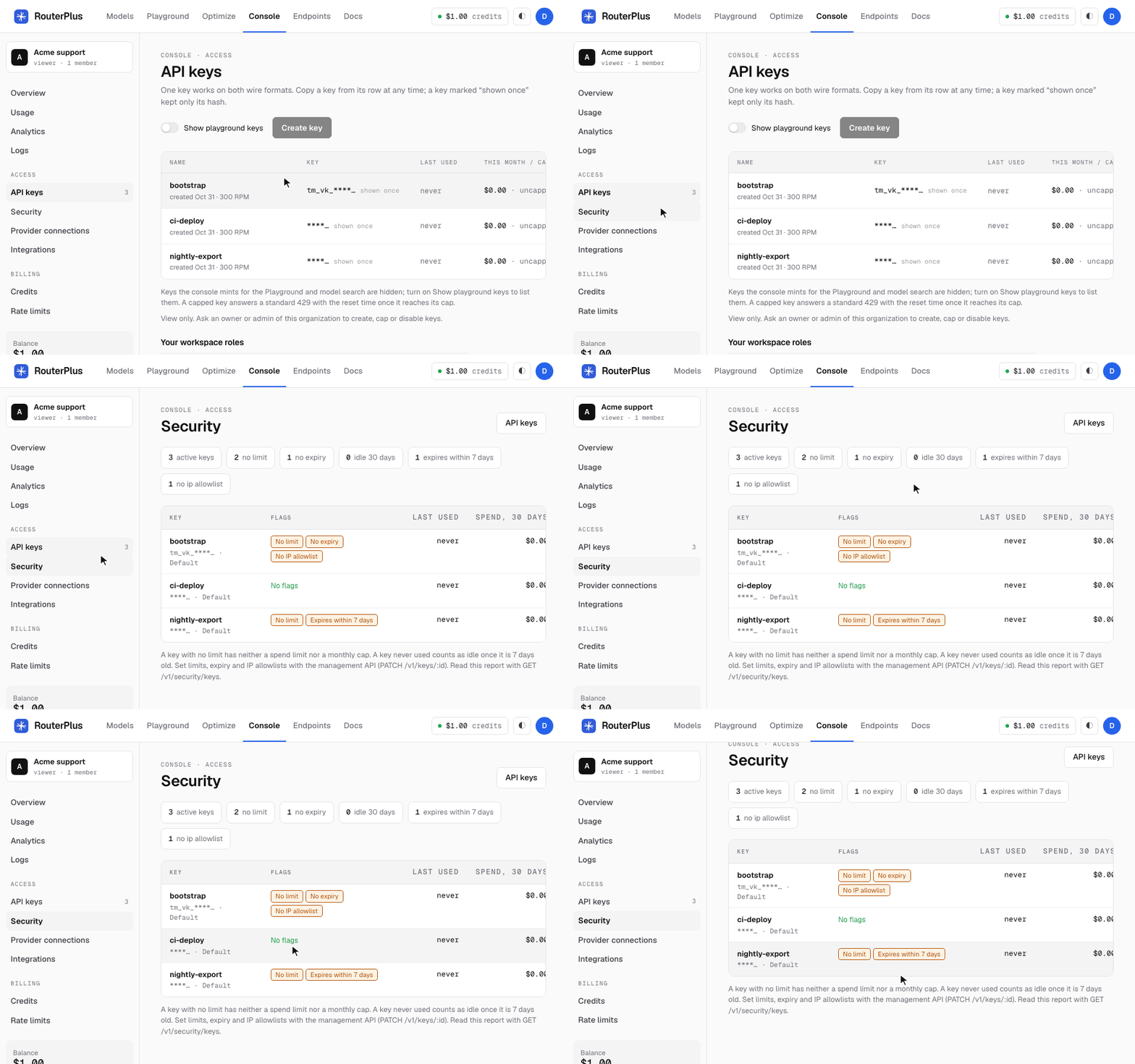
Access > Security in the console lists each active key with its flags: no limit, no expiry, idle 30 days, expires within 7 days and no IP allowlist:
Next: Quickstart for browser signup and the first API calls, or Errors for the complete error_type table.
For agents: /docs/authentication.md and /llms.txt